
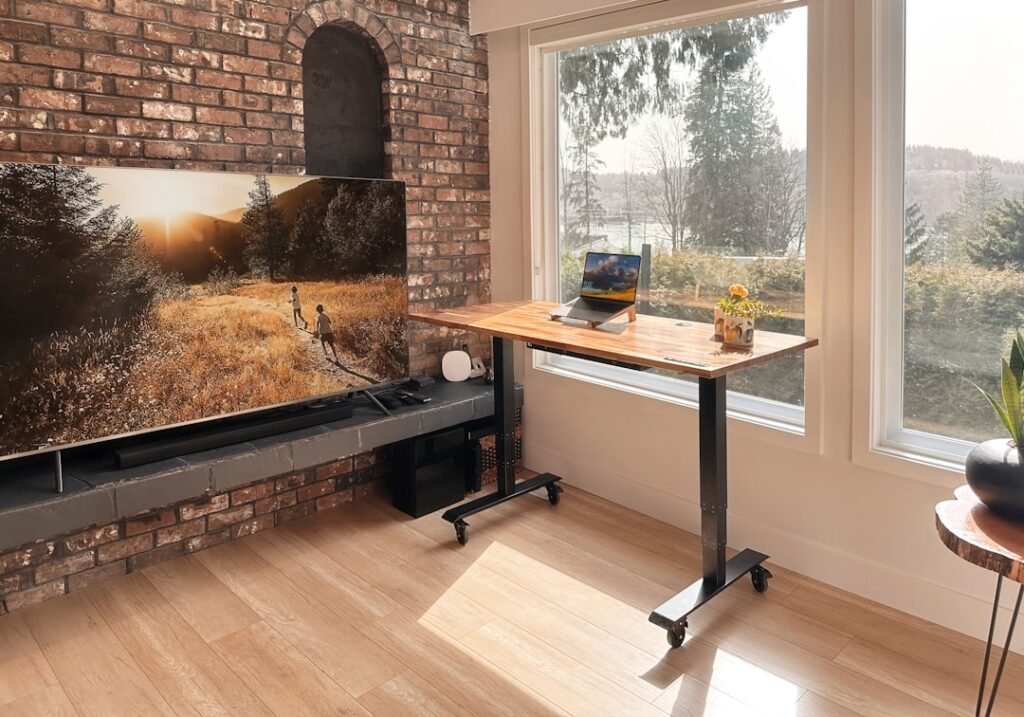
An under desk walking pad sounds almost too simple: put a slim treadmill beneath a standing desk, walk slowly, and turn part of the workday into movement. The appeal is obvious for anyone who spends hours editing, designing, writing, coding, answering email, or sitting through calls. What matters, however, is not whether the idea looks healthy on social media. What matters is whether it fits real work.
The most useful way to think about a walking pad is not as gym equipment. It is a way to interrupt long blocks of sitting. That distinction matters because a workday is full of different tasks. Some tolerate gentle movement well; others need stillness, precision, or a chair. A good setup lets you switch between those modes instead of forcing yourself to walk all day.
This guide looks at one product currently listed in the MorningVibes9 store—the Ultra-Slim Under-Desk Walking Pad Foldable Treadmill—and uses it as a practical case study. The goal is not to turn a product page into an article. It is to answer the questions that matter before buying: when a walking pad helps, which work tasks pair well with it, how to set up the desk, what a realistic first week looks like, and when you should simply sit down.
The 2 p.m. problem is not always motivation
Many desk workers know the pattern: the morning starts with intention, but by mid-afternoon the body feels stiff and the brain feels dull. It is tempting to answer that slump with another coffee or a promise to exercise later. A more practical approach is to change the structure of the workday itself.
Public-health guidance consistently emphasizes total movement across the week. The World Health Organization recommends regular physical activity and notes that activity can come from work, transport, recreation, and daily life—not only formal workouts. The CDC similarly recommends at least 150 minutes of moderate-intensity activity per week for adults, plus muscle-strengthening activity on two days.
A walking pad does not magically satisfy every part of those guidelines. Slow desk walking may not reach moderate intensity for everyone, and it does not replace strength training. Its value is more modest and, in my view, more believable: it can make it easier to spend less of the day completely still.
Research note
A 2021 systematic review and meta-analysis found treadmill-desk interventions increased energy expenditure and reduced sitting time in adults with sedentary occupations. That does not mean every person needs a treadmill desk. It means the concept has a reasonable evidence base when the goal is replacing some sedentary time with low-intensity movement.
Product in focus: what MorningVibes9 is actually selling
The product listed on MorningVibes9 is the Ultra-Slim Under-Desk Walking Pad Foldable Treadmill. According to the current listing, it uses a 2.25 HP motor, has an LED dashboard, includes a wireless remote, and is designed to slide under a standing desk or be stored beneath furniture when not in use.
Those details matter more than decorative features. For desk work, the useful questions are practical: Is it compact enough for the room? Can it be controlled without bending down? Can you see basic walking information? Can it be moved out of the way when you need to sit?
The listing describes the unit as quiet, but noise is something I would judge in your actual room rather than from a specification. Hard floors, hollow upstairs rooms, nearby family members, video calls, and microphone sensitivity can all change what “quiet” feels like. If you live in an apartment, a dense equipment mat may be as important as the treadmill itself.
The product is currently part of the Fitness & Core Training collection. If you are comparing several movement tools rather than shopping for one specific unit, start with that category and look at how each item fits the way you actually work.
The three-mode workday
A walking pad becomes more useful when you stop thinking in terms of “walking versus sitting” and start thinking in work modes.
| Work mode | Best for | Practical cue |
|---|---|---|
| Walk | Email triage, calendar planning, listening, light reading | Keep the pace easy enough that the task still feels automatic |
| Stand | Detailed replies, spreadsheets, moderate-focus work | Stop the belt but keep the desk raised |
| Sit | Design, keyframing, precision mouse work, deep writing | Choose stability when accuracy matters |
Mode 1: Walk for low-friction tasks. This is the easiest place to begin. Email triage, calendar planning, listening to a webinar, reviewing notes, organizing files, or joining an audio-heavy meeting often pair well with slow walking because the task does not demand fine cursor control.
Mode 2: Stand still for moderate-focus tasks. Writing a detailed response, editing a layout, or doing spreadsheet work can become annoying if your body is moving faster than your hands and eyes want to move. Stop the belt, keep the desk raised, and continue standing. You still change posture without turning concentration into a balancing exercise.
Mode 3: Sit for precision and deep work. Illustration, motion-graphics keyframing, color correction, long-form writing, financial work, and detailed design often deserve a stable seated position. Sitting is not failure. The problem is staying in one position for hours without interruption.
This three-mode approach is more sustainable than chasing a daily step number while trying to do every task on the treadmill.
What research says about productivity
One common fear is that walking will make computer work worse. The answer is more nuanced than “yes” or “no.” An office-task laboratory study found that walking at a treadmill workstation could affect some simulated office tasks, which is one reason slow pace and task selection matter. On the other hand, a 12-month workplace study reported increased daily physical activity and improvements in work performance after treadmill workstations were introduced.
The sensible takeaway is not that walking boosts productivity for everyone. It is that adaptation, task type, pace, and personal preference matter. You may find that calls and reading feel natural while detailed mouse work feels terrible. That is useful information, not a reason to abandon the setup.
A seven-day walking pad experiment
Before trying to hit ten thousand steps during office hours, run a smaller experiment. Treat the first week as a setup test, not a fitness challenge.
- Day 1: Use the pad for ten minutes while doing a task you could complete almost automatically, such as checking email. Notice balance, desk height, screen position, and noise.
- Day 2: Try two ten-minute sessions separated by normal seated work. Pay attention to your feet and calves. New equipment often feels exciting enough that people overdo the first session.
- Day 3: Use one walking block during a call or video you mostly need to listen to. If your camera is on, decide whether the motion is distracting for the other person.
- Day 4: Test a reading or research block. Keep the pace easy enough that your eyes remain comfortable on the screen.
- Day 5: Add a standing-only block after walking. This teaches you to use the raised desk even when the treadmill is off.
- Day 6: Notice friction. Is the pad difficult to move? Is the remote easy to reach? Are cables safe? Do you avoid using it because setup takes too long? Friction is often a better predictor of long-term use than motivation.
- Day 7: Keep only the parts that worked. A useful routine might be twenty minutes in the morning, fifteen minutes after lunch, and a few short walking calls. There is no prize for using the pad all day.
Set it up like a workstation, not a fitness challenge
The treadmill is only one part of the system. Desk height and screen position can determine whether the experience feels natural.
- Your elbows should be able to rest near the keyboard without your shoulders creeping upward.
- Keep the top part of the screen around comfortable eye level so you are not looking down for an hour.
- Keep the keyboard and mouse close enough that you are not reaching forward while moving.
- Route power cords, charger cables, headphone wires, and loose clothing well away from the moving belt.
- Leave clear space to step off the rear and sides before you start.
Footwear is personal, but the general principle is comfort and traction. Start with whatever lets you walk naturally and stop immediately if you feel pain, dizziness, unusual shortness of breath, numbness, or instability.
If you are new to standing-desk work, change one variable at a time. Raising the desk for hours and adding long walking sessions on the same day makes it hard to know what caused discomfort.
What a walking pad cannot replace
This is where marketing often becomes unhelpful. A walking pad is not a substitute for a complete exercise program. Slow walking can add movement, but adults still benefit from dedicated aerobic activity and muscle-strengthening work. It is also not a treatment for back pain, weight gain, circulation problems, or fatigue.
Think of it as environmental design: instead of depending on willpower to leave the desk every hour, you make low-intensity movement available inside the workspace.
If prolonged sitting leaves you uncomfortable, movement breaks can be one part of the solution. MorningVibes9 also has a separate guide on five-minute spine decompression for desk workers. Treat that article as general educational information, not medical advice, and seek professional guidance for persistent pain.
Who should be careful
A motorized belt requires attention even at a slow pace. Anyone with balance problems, recent surgery, significant joint pain, dizziness, neurological symptoms, pregnancy-related exercise restrictions, or a medical condition that affects safe walking should talk with a qualified healthcare professional before using this kind of equipment.
Do not use the walking pad while carrying hot drinks, while distracted by a phone, or during work that makes you forget where your feet are. Keep children and pets away from the moving belt. Follow the manufacturer’s safety and maintenance instructions rather than treating a general article like a product manual.
A walking pad also deserves a realistic space check. Measure the area beneath your desk and the path you will use to store the unit. Confirm that the desk can rise high enough for comfortable typing. If the treadmill is going upstairs, consider total weight and how easily you can move it.
The buying lens I would use
Ignore the fantasy version of the product—the one where every morning starts with two effortless hours of walking and inbox zero. Evaluate the boring details.
- Storage: If you cannot put it away easily, will it become permanent floor clutter?
- Control: A wireless remote is useful because you can start, stop, or adjust the unit without reaching near the belt.
- Display: Basic feedback such as time or pace can help, but the display should not become another number you obsess over.
- Noise: Consider the motor, your foot strike, the floor, and your microphone—not just a marketing adjective.
- Desk compatibility: The treadmill and desk have to function as one workstation. A great pad under the wrong desk is still a bad setup.
- Return and shipping terms: MorningVibes9 is a dropshipping store, so shipping options, delivery times, stock, and return conditions can vary by destination and supplier. Check the product page and checkout information before ordering rather than assuming a universal delivery promise.
The MorningVibes9 pick, with context
The Ultra-Slim Under-Desk Walking Pad is interesting because its listed features match the core needs of a desk setup: a slim footprint, remote control, an LED display, and a motor designed for walking. That makes it easier to discuss as a workday tool instead of pretending it is a replacement for a full-size training treadmill.
I would consider it if your biggest problem is long, uninterrupted sitting and you already have—or plan to use—a height-adjustable desk. I would skip it if your work is mostly precision mouse work, your room has no safe storage space, or you know you dislike multitasking while moving.
The product page is the right place to check current price, stock, shipping, and final specifications. If you are still exploring, browse the full MorningVibes9 shop rather than buying the first movement product you see.
Frequently asked questions
Is an under desk walking pad good for an eight-hour workday?
It can be useful during parts of the day, but walking continuously for eight hours is unnecessary and may be uncomfortable. Short walking blocks mixed with standing and sitting are a more realistic starting point.
How fast should I walk while working?
There is no universal best speed. Start very slowly—slow enough that typing, reading, and stepping off feel controlled. Increase only if the task still feels easy and stable. For demanding computer work, stopping the belt may be the better choice.
Does desk walking count as exercise?
It counts as physical activity, but very slow walking may not reach moderate intensity. Public-health guidelines also include dedicated aerobic activity and muscle strengthening, so a walking pad should complement rather than replace a broader movement routine.
Can I use a walking pad during video calls?
You can, but test it first. Camera movement, breathing, footstep noise, and your own attention can affect the call. Audio-only meetings are usually the easiest place to start.
Is this article a sponsored review?
No. MorningVibes9 sells the featured product, so there is a commercial relationship with the product page. This article is an editorial guide built around practical use, public-health guidance, and published research. Product specifications are based on the current store listing and should be verified on the product page before purchase.
Final thought
The best walking-pad routine is not the one that produces the largest step count. It is the one you can repeat without making work harder. If ten quiet minutes after breakfast makes the rest of the morning feel better, that is useful. If walking during calls helps you avoid another hour in the chair, that is useful. If a detailed design task requires sitting, sit.
An under desk walking pad works best as a flexible option inside a varied day. Move when movement fits the task. Stand when you want a posture change. Sit when precision matters. Then do the real exercise your body still needs away from the inbox.
Sources & editorial transparency
Research references: WHO physical activity guidance, CDC adult activity guidance, and peer-reviewed treadmill-workstation research indexed by PubMed. Product specifications come from the live MorningVibes9 WooCommerce listing. Featured photo credit: EFFYDESK / Unsplash. This article provides general educational information and is not medical advice.
Loved this?
Join Slow Mail — Tuesday journals + Sunday rituals.